

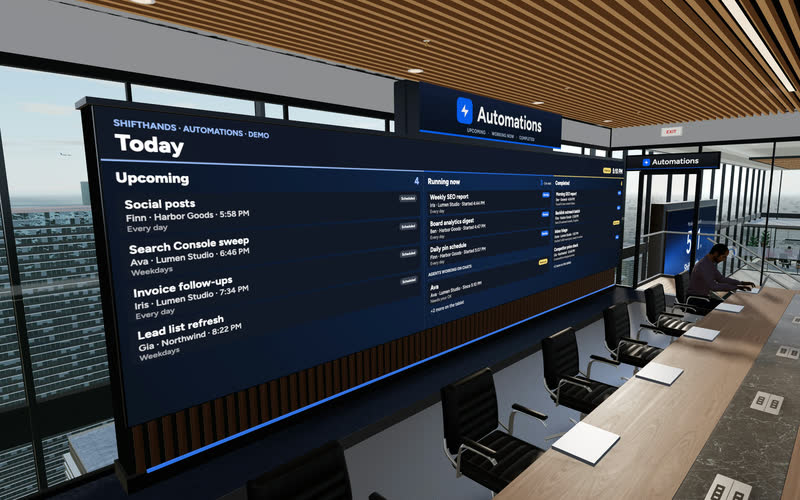
The Automations Wall
A big screen shows today’s Upcoming, Running now and Completed automations. Step up to the tablet to take a closer look at any run.
BridgeMind and Cursor solve different problems. Cursor, by Anysphere, is primarily an AI code editor and coding-agent platform, with a CLI and cloud agents. BridgeMind, by BridgeMind LLC, is a desktop workspace that brings agents such as Claude Code and Codex together with routines, coding threads and live shells.
BridgeMind
by BridgeMind LLC
Desktop agent workspace
Cursor
by Anysphere
AI code editor and coding-agent platform
if the editor itself should be the centre of your coding workflow, with agents inside it and in the cloud.
if you want a desktop workspace around several coding agents, with routines, live shells and threads.
if what you need is to supervise project-organized agents on your own Mac, from a browser or phone.
Product one
BridgeMind calls its app "the Agent Super App": one native desktop app for agents, coding and conversations. Its demo shows Claude Code and Codex working in stacked panes, beside a docked browser and a dashboard of running agents.
Sources: BridgeMind homepage, BridgeMind pricing and BridgeMind docs, read October 2, 2026.
Check first BridgeMind's documentation disagrees with its website. The docs list macOS 26 as available, Windows as in development and Linux as not supported. Check the docs before you plan on Windows or Linux.
Product two
Cursor calls itself "your coding agent for building ambitious software". It is primarily an AI code editor and coding-agent platform, with the same agent available in the editor, the terminal and the cloud.
Sources: Cursor homepage, Cursor pricing, Cursor download, Cursor cloud agents and Cursor CLI, read October 2, 2026.
| Dimension | BridgeMind | Cursor |
|---|---|---|
| Product type | Desktop agent workspace | AI code editor and coding-agent platform |
| Main coding interface | Code mode: terminals, agent threads, files and browsers around a folder | The Cursor editor, plus the CLI |
| Agent approach | Runs agents such as Claude Code and Codex, plus named teammates | Cursor's own agent, in the editor, CLI and cloud |
| Where agent work runs | Through its desktop app | Locally, or in cloud VMs for cloud agents |
| Desktop platforms | Website: Mac, Windows, Linux. Docs: macOS only today | macOS, Windows, Linux |
| Cloud execution | Not listed | Yes cloud agents |
| AI and model access | Your own subscription or API key | Included within plan limits |
| CLI | Not listed | Yes Cursor CLI |
| Browser or preview | Docked browser in Code mode | Cloud agents can control a desktop and browser |
| Scheduled work | Routines, while the app is running | Automations, listed alongside cloud agents |
| Paid entry price | Basic, $20/month | Pro, $20/month |
| Free plan | None listed | Hobby, free |
| Best fit | A workspace around the coding agents you already pay for | An editor-centred workflow with built-in agents |
"Not listed" means we could not find it on the product's own site on October 2, 2026.
The two bill in different ways, so a lower sticker price does not mean a lower total.
BridgeMind
from $20/month
Cursor
from $0/month
Neither is simply cheaper. BridgeMind's total includes your separate AI plan; Cursor's includes model use up to its limits. Compare both against your own usage.
A third option
Some people comparing BridgeMind and Cursor really want a third shape: agents organized by project, running on their own Mac, that they can check on from a phone. That is what ShiftHands does.
See it working
Click through the real app: projects down the side, a chat per agent, automations that report back, and a browser you can take over. The agents do the typing.
Recorded in the ShiftHands demo workspace.
Virtual Environment
Every ShiftHands plan, Free included, comes with the Virtual Environment: a 3D office in the app where your agents work at their desks, grouped by project. Walk over, pull up a chair, and watch your crew get it done.

A big screen shows today’s Upcoming, Running now and Completed automations. Step up to the tablet to take a closer look at any run.
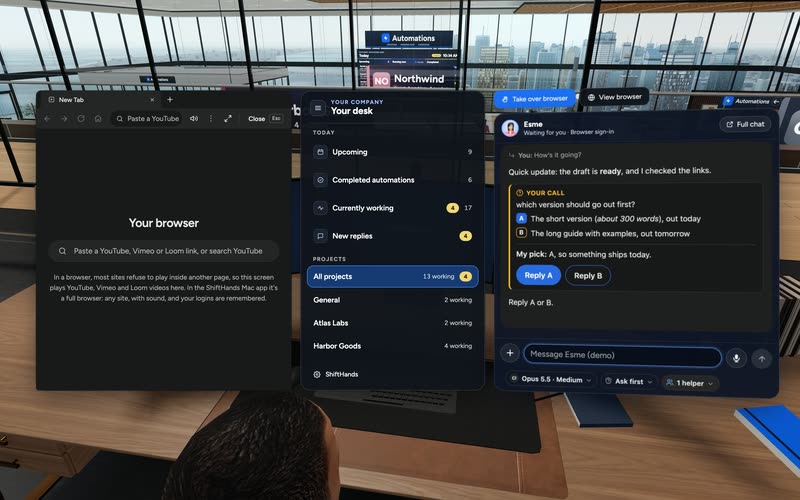
Sit down to see every project and every agent at a glance, and chat with anyone without leaving your chair.

Every agent has a desk in its project area. Agents running an automation head to the Automations room. Walk up to any agent and chat.
Rendered in the ShiftHands demo workspace with made-up names. Open the Virtual Environment from the sidebar or from Chief of Staff in the app. Agents still run on your Mac and use your connected AI accounts.
ShiftHands
Trade-off The Mac must stay on with ShiftHands open. Intel Macs, Windows and Linux are not supported yet.
To see what your Mac needs, read where ShiftHands agents run.
Cursor is primarily an AI code editor with its own agent, a CLI and cloud agents. BridgeMind is a desktop workspace that brings agents such as Claude Code and Codex together with routines, shells and threads.
Partly. Both help you build software with AI agents. BridgeMind organizes agents and terminals around your folders, while Cursor centres on its editor.
Yes. BridgeMind lets you bring your own AI subscription or API key, including Claude and ChatGPT/Codex. Its demo shows Claude Code and Codex running side by side.
Yes. Cursor's cloud agents run in isolated cloud VMs with full development environments. You can start them from the web, the desktop app, Slack, GitHub or the API.
Both paid entry plans are $20 a month. Cursor has a free Hobby plan and includes model use within limits. BridgeMind lists no free plan, and your AI provider bills you separately.
Yes. ShiftHands runs project-organized agents on your own Apple-silicon Mac, and you supervise them from a browser or phone. It suits people who want to manage agents rather than pick an editor.
Product names belong to their owners. ShiftHands is not affiliated with BridgeMind or Cursor. Facts and prices were checked on each product's own site on October 2, 2026 and can change.