

The Automations Wall
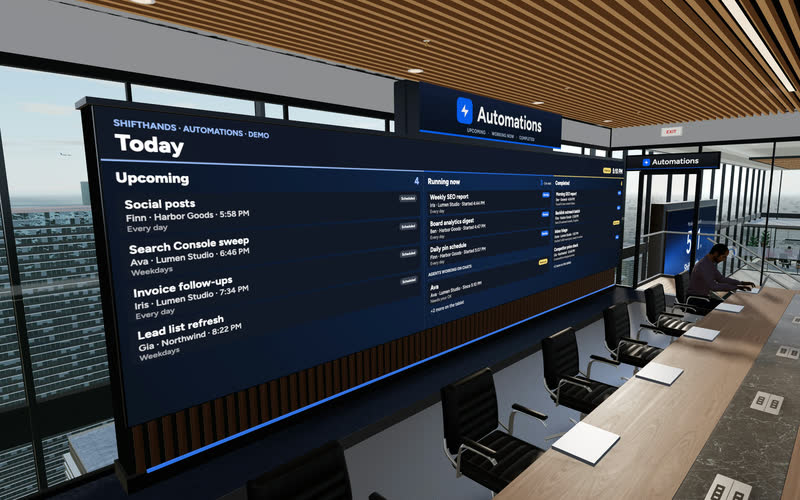
A big screen shows today’s Upcoming, Running now and Completed automations. Step up to the tablet to take a closer look at any run.
OpenClaw is a self-hosted AI agent Gateway that connects assistants to chat apps, tools and scheduled work. Zapier is a managed automation platform for connecting business applications, building workflows and adding AI-powered steps. Choose OpenClaw if you want an agent running on infrastructure you control, or Zapier if you want hosted integrations and workflow automation without maintaining your own Gateway. You can also connect the two through Zapier MCP.
This comparison is published by ShiftHands, which offers a separate Mac-hosted AI agent workspace. We compared documented product capabilities, not independent hands-on performance tests. ShiftHands is not affiliated with the OpenClaw Foundation or Zapier.
OpenClaw
OpenClaw Foundation
Self-hosted AI agent Gateway
Zapier
Zapier
Managed workflow automation
The tour below shows ShiftHands, the publisher of this comparison. It is not a demonstration of OpenClaw or Zapier.
See it working
Click through the real app: projects down the side, a chat per agent, automations that report back, and a browser you can take over. The agents do the typing.
Recorded in the ShiftHands demo workspace.
Virtual Environment
Every ShiftHands plan, Free included, comes with the Virtual Environment: a 3D office in the app where your agents work at their desks, grouped by project. Walk over, pull up a chair, and watch your crew get it done.

A big screen shows today’s Upcoming, Running now and Completed automations. Step up to the tablet to take a closer look at any run.
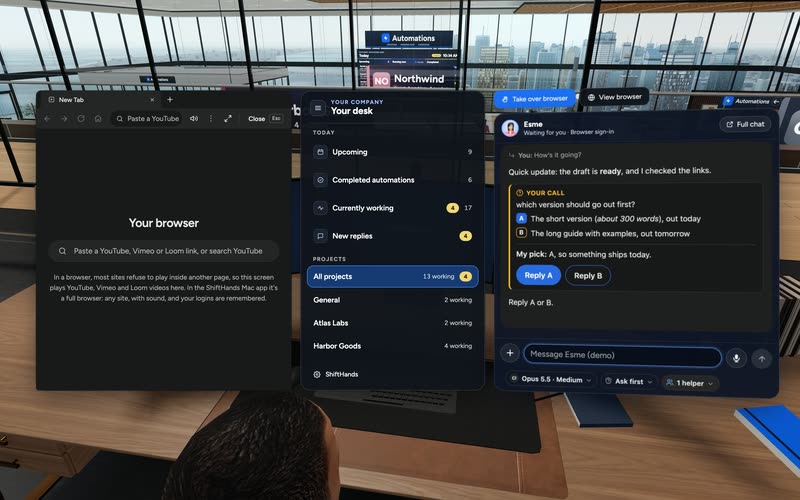
Sit down to see every project and every agent at a glance, and chat with anyone without leaving your chair.

Every agent has a desk in its project area. Agents running an automation head to the Automations room. Walk up to any agent and chat.
Rendered in the ShiftHands demo workspace with made-up names. Open the Virtual Environment from the sidebar or from Chief of Staff in the app. Agents still run on your Mac and use your connected AI accounts.
OpenClaw is an agent you host and talk to. Zapier is a hosted platform for app-to-app workflows that now includes AI steps. The table compares documented features, row by row.
| Dimension | OpenClaw | Zapier |
|---|---|---|
| Product type | Self-hosted AI agent Gateway | Managed workflow and AI automation platform |
| Primary interface | Messaging channels, Control UI and companion apps | Visual Zap editor, AI tools and connected clients |
| AI agents | Persistent agent sessions, multiple agents and tools | Changing Standalone Agents transitioning to AI by Zapier |
| Workflow structure | Agent-driven tasks, configurable tools and automations | Triggers, actions, branching logic and AI steps |
| Integrations | Channels, skills, plugins, APIs and MCP | 9,000+ apps, Zapier MCP and SDK |
| Deployment | Own computer or server | Zapier-hosted cloud platform |
| Setup and maintenance | Configure and maintain the Gateway, models and channels | Connect accounts and build workflows; hosting managed by Zapier |
| Local-computer tools | Configurable shell, file and browser access | Primarily connected applications and supported actions |
| Scheduling | Yes One-shot and recurring automations | Yes Scheduled Zaps and other workflow triggers |
| Event triggers | Authenticated hooks, messaging events and Gmail triggers | App events, polling, schedules and webhooks |
| Results and delivery | Agent responses, chat channels or configured webhooks | Workflow outputs and connected application actions |
| Human approvals | Configurable execution and tool approvals | Configurable AI-tool approvals and workflow review steps |
| Security controls | Pairing, allowlists, tool policies and optional sandboxing | Managed connections, access controls and plan-dependent governance |
| Model access | Configurable hosted or local model providers | Supported AI models and eligible user-level API-key options |
| Licence | MIT | Proprietary hosted software |
| Free offering | Free Free open-source software | Free plan Free plan with 100 monthly tasks |
| Paid costs | Model usage, optional hosting and maintenance | Task-based plans; separate activities for standalone Agents |
| Best fit | Messaging-centred assistants on controlled infrastructure | Multi-application business automation without self-hosting |
Facts come from each product's own site and documentation, read on November 25, 2026. We compared documented features; we did not run hands-on tests. Zapier's app count and OpenClaw's list of messaging channels are different kinds of integration, so the numbers are not directly comparable.
OpenClaw is an agent Gateway. Zapier is managed business automation. Both now overlap in the middle.
OpenClaw
With a message to your assistant in a chat app such as WhatsApp, Telegram or Discord, or with a scheduled job.
Zapier
With a trigger in a connected app, a schedule or a webhook, which starts a Zap.
OpenClaw
The agent decides which tools to use, within the permissions you configure.
Zapier
You lay out the steps in the Zap editor. AI by Zapier steps can make tool-calling decisions inside that structure.
OpenClaw
The Gateway, its models, channels, permissions and updates, on hardware you choose.
Zapier
Your workflows, app connections and error handling. Zapier runs the infrastructure.
Neither label is the whole story. Zapier now supports agentic decisions inside structured workflows, and OpenClaw supports scheduled and event-triggered automation.
OpenClaw is built around long-running agents. Zapier is built around workflows, with AI added as steps.
OpenClaw
Zapier
Source: Migrating from Agents to AI by Zapier, read November 25, 2026.
OpenClaw puts the Gateway in your hands. Zapier removes the server but not the workflow work.
OpenClaw
Zapier
Want a workflow builder you can self-host instead? See OpenClaw vs n8n.
Zapier's strength is its app catalogue. OpenClaw's strength is reaching an agent from chat apps and extending its tools.
OpenClaw
Zapier
Zapier publishes a setup guide for connecting OpenClaw to Zapier MCP, and OpenClaw documents its MCP commands. The two catalogues are not equivalent: one lists apps, the other channels and tools.
Both can run work without you starting it. They start it in different ways.
OpenClaw
Zapier
OpenClaw's safety depends on how you configure your host. Zapier manages the platform, but your workflows still carry risk.
OpenClaw
Zapier
In both products, only the actions you configure pause for approval. Nothing is gated by default for every step.
OpenClaw has no software fee but has running costs. Zapier charges by plan and usage.
| Plan | OpenClaw | Zapier |
|---|---|---|
| Free | Free MIT-licensed software | $0; 100 tasks/month; two-step Zaps |
| Professional | No equivalent paid tier | From $19.99/month billed annually |
| Team | No equivalent paid tier | From $69/month billed annually |
| Enterprise | No official paid enterprise edition | Contact sales |
Zapier's paid prices vary with the task allowance and billing period you choose. Professional adds multi-step Zaps, premium apps and webhooks; Team adds up to 25 users, shared Zaps and SAML SSO.
OpenClaw itself costs nothing, but you pay your AI model provider directly (or run a supported local model), plus any server and third-party services you use.
| Plan | Price | Usage |
|---|---|---|
| Agents Free | $0 | 400 activities/month |
| Agents Pro | $33.33/month, $400 billed annually | 1,500 activities/month |
| Agents Enterprise | Custom | Custom activity allowance |
These are the standalone Zapier Agents plans listed when this comparison was checked on November 25, 2026. Zapier is migrating Agents into AI by Zapier, which uses task-based billing within the main automation platform. Check the current product availability and billing terms before subscribing.
| Unit | Meaning |
|---|---|
| OpenClaw model usage | Provider-specific tokens, subscriptions or local inference |
| Zapier task | Generally a successful billable action, subject to step-specific rules |
| Zapier Agents activity | A billable agent action, such as tool use, browsing or knowledge retrieval |
| Zapier MCP call | A tool invocation governed by current MCP usage rates and promotions |
| AI by Zapier usage | Task consumption determined by model tier, tools and execution behaviour |
A Zapier task, an agent activity and an OpenClaw model request are different billing units. Comparing their headline allowances does not establish which platform is cheaper for a particular workflow.
Example: a Classic Zap with three successful billable actions consumes three tasks, rather than one task for the whole workflow. AI steps and Next Gen Zaps follow their own rules on Zapier's task usage rates page.
As checked on November 25, 2026, Zapier is running a temporary MCP promotion through January 5, 2027 at noon Eastern Time. MCP tool calls do not consume tasks during the promotion, subject to its terms and account limits. Zapier also documents upcoming billing changes for December 2026, so check its current task usage rates rather than assuming the promotional allowance is permanent.
OpenClaw can replace some Zapier workflows when an AI agent has access to the necessary tools, accounts and triggers. It is not a direct replacement for Zapier's managed application integrations, visual workflow builder, execution history and team governance. Whether it can replace a particular Zap depends on the integration, reliability requirements, permissions and maintenance you are willing to manage.
| Requirement | Better starting point |
|---|---|
| Repeatable transfer of information between CRM, forms and spreadsheets | Zapier |
| A conversational assistant researching information and using tools on your own computer | OpenClaw |
| An assistant that needs to act across established business-app integrations | OpenClaw with Zapier MCP, where supported |
An AI agent will not automatically reproduce every workflow correctly. Test each one before you switch.
Yes. OpenClaw and Zapier can work together through Zapier MCP. OpenClaw handles the conversation and agent reasoning, while Zapier exposes supported actions across its connected applications. This lets an OpenClaw agent use Zapier-managed integrations without requiring the user to build every application connection from scratch.
Receives your request
Exposes authorised tools
Connected services
Documented integration architecture, not a workflow independently tested by ShiftHands.
Ask OpenClaw through Telegram to retrieve selected CRM records and summarise outstanding customer enquiries. With the appropriate Zapier MCP tools and account permissions configured, OpenClaw can request the relevant information from the connected application and return a summary.
Trade-off You are responsible for the Gateway, its permissions, updates and availability. External models and hosting can add operating costs.
Read our OpenClaw review for a closer look.
Trade-off Zapier's usage is metered, and costs depend on your task allowance, workflow actions and AI features. Some capabilities require paid plans.
OpenClaw is a self-hosted agent Gateway you talk to through chat apps. Zapier is a hosted platform that connects business apps with workflows and AI steps.
For some workflows, yes, if the agent has the tools, accounts and triggers it needs. It does not replace Zapier's app integrations, visual builder, run history or team governance.
OpenClaw is built around persistent agents with their own sessions and host tools. Zapier adds agentic AI steps inside structured workflows. Pick OpenClaw for an always-available assistant, Zapier for AI inside app workflows.
Zapier Agents is a hosted agent product billed in activities that is moving into AI by Zapier. OpenClaw is free software you run yourself, paying only for models and hosting.
Zapier is migrating Agents into AI by Zapier in the Zap editor. As of November 25, 2026 it had not set a date to turn off Agents and says it will email users with notice first.
OpenClaw is free, MIT-licensed software, but models and hosting can cost money. Zapier has a Free plan with 100 tasks a month and two-step Zaps.
Each successful billable action in a Classic Zap generally counts as one task, so three successful billable actions consume three tasks. AI steps and Next Gen Zaps have their own usage rules, and paid plans vary by task allowance.
Not as native built-in apps. OpenClaw can reach Zapier's connected apps through Zapier MCP, using the tools you authorise.
Yes. Zapier publishes a guide: paste its setup prompt into a new OpenClaw conversation, then sign in to your Zapier account when asked.
As checked on November 25, 2026, MCP tool calls use no tasks during a promotion that runs until January 5, 2027 at noon ET, subject to its terms. After that, normal task rates apply.
Yes. OpenClaw has one-shot and recurring automations. Zapier has scheduled Zaps plus app-event and webhook triggers.
You can self-host OpenClaw on your own computer or server. Zapier's standard automation platform is hosted by Zapier.
Zapier is usually quicker to start because there is no server to run; you connect accounts and build Zaps. OpenClaw needs you to install and configure the Gateway, models and channels.
Neither is automatically safer. Zapier offers managed credentials, certifications and per-tool approvals; OpenClaw offers pairing, allowlists, execution approvals and optional sandboxing that you configure yourself.
Not necessarily. OpenClaw supports external AI providers and local models, so a separate paid model subscription is not always required. AI by Zapier meters AI usage through tasks and supports connecting your own API key at the user level, subject to its current billing rules.
If your work is moving data between business apps, Zapier is the simpler start. If you want an assistant on your own hardware that you can message, OpenClaw fits better.
n8n is a workflow builder you can self-host or use in its cloud, billed per workflow execution. See our OpenClaw vs n8n comparison for details.
Other self-hosted agents, workflow builders such as n8n, and Mac agent workspaces such as ShiftHands. See our OpenClaw alternatives for a shortlist.