

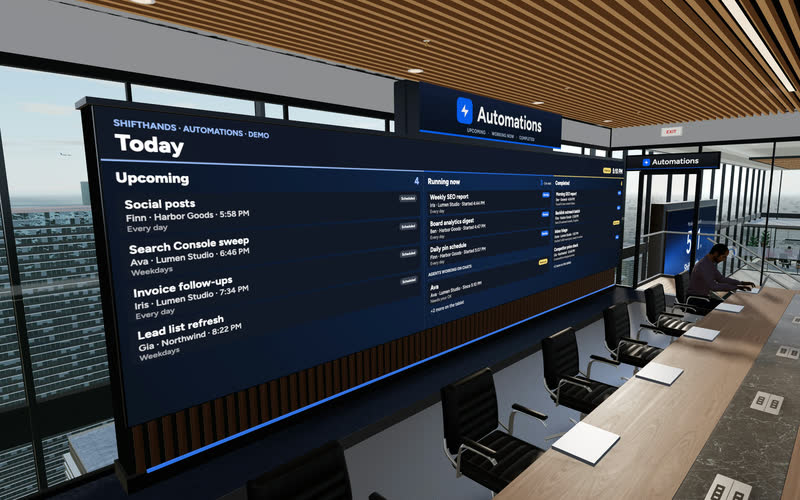
The Automations Wall
A big screen shows today’s Upcoming, Running now and Completed automations. Step up to the tablet to take a closer look at any run.
ShiftHands lets you create AI agents with their own jobs, chats and schedules, then manage them like a small digital team. Give agents research, content, product or operational tasks, check their results and step in when they need you. Your AI employees run on your own Apple-silicon Mac, while you supervise them from the Mac app or a phone browser.
What are AI employees? AI employees are AI agents assigned ongoing roles and tasks in a workflow. They are software, not people or legally employed staff. Their capabilities depend on the models, tools, permissions and supervision provided.
ShiftHands is a Mac app for running and supervising a team of AI agents. The agents run on your own Apple-silicon Mac; you can monitor their work, chat with them and respond to flagged command approvals from the Mac app or a desktop or phone browser.
Give each agent one clear job and a result you can check. Here are five example roles you could set up yourself.
“Research these five competitors and summarise changes with source links.”
You review: Research findings and supporting sources.
“Draft three posts using our approved product notes.”
You review: Drafts and factual accuracy.
“Review these bug reports and propose fixes in this project.”
You review: Code changes, test results or a proposed plan.
“Every Monday, summarise these project notes and outstanding tasks.”
You review: Scheduled report and next steps.
“Enter this sample record into the test form and leave it for review.”
You review: Entered fields before submission.
Example AI employee roles configured in ShiftHands. They are not prebuilt specialist integrations, and results depend on the connected model, accessible tools and instructions.
Five example roles need Pro. Free has one project and three agents, so start with the three jobs that matter most.
Building a founder team? See AI agents for startups.
See it working
This is the real ShiftHands app with demo data. Open a project, pick an agent, check its status and read the tasks it has finished.
Recorded in the ShiftHands demo workspace.
Virtual Environment
Every ShiftHands plan, Free included, comes with the Virtual Environment: a 3D office in the app where your agents work at their desks, grouped by project. Walk over, pull up a chair, and watch your crew get it done.

A big screen shows today’s Upcoming, Running now and Completed automations. Step up to the tablet to take a closer look at any run.
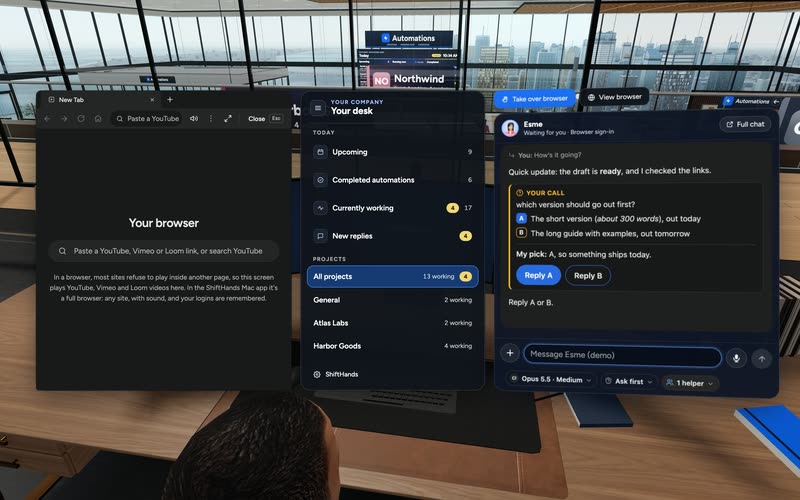
Sit down to see every project and every agent at a glance, and chat with anyone without leaving your chair.
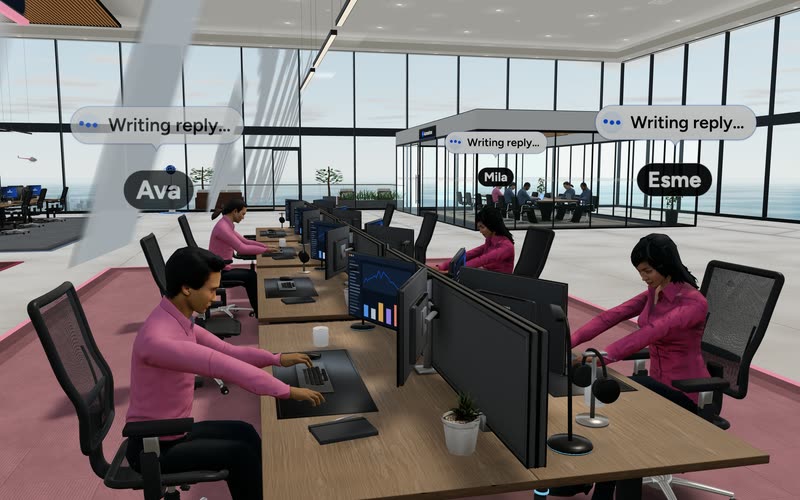
Every agent has a desk in its project area. Agents running an automation head to the Automations room. Walk up to any agent and chat.
Rendered in the ShiftHands demo workspace with made-up names. Open the Virtual Environment from the sidebar or from Chief of Staff in the app. Agents still run on your Mac and use your connected AI accounts.
Each AI employee is a ShiftHands agent. You give it a name, a role and instructions, choose the model it uses, and hand it tasks in its own chat. It works on your Mac, posts the result and waits for the next job.
That’s the difference from a single chatbot conversation. The agent keeps its own history and role, so you can come back tomorrow, give it the next task and it picks up where the work stands.
New to running agents on your own Mac? Start with our AI agent for Mac guide to understand the workspace, supported models and setup requirements.
Name the agent and describe its job in plain words.
Each agent uses the model you pick, from your connected provider.
Agents can work with files, run commands and use a browser on your Mac.
Give it one job in chat, or schedule one.
It posts the finished work back in its chat for you to check.
Review the result, then hand it the next job.
Projects and teams
Put related agents in one project. A launch project might hold a Research Assistant, a Content Assistant and a Product Assistant, each in its own chat with its own history and model. Give one agent a big job and it can split the work across named helpers running in parallel. The Helpers panel shows their progress and results.
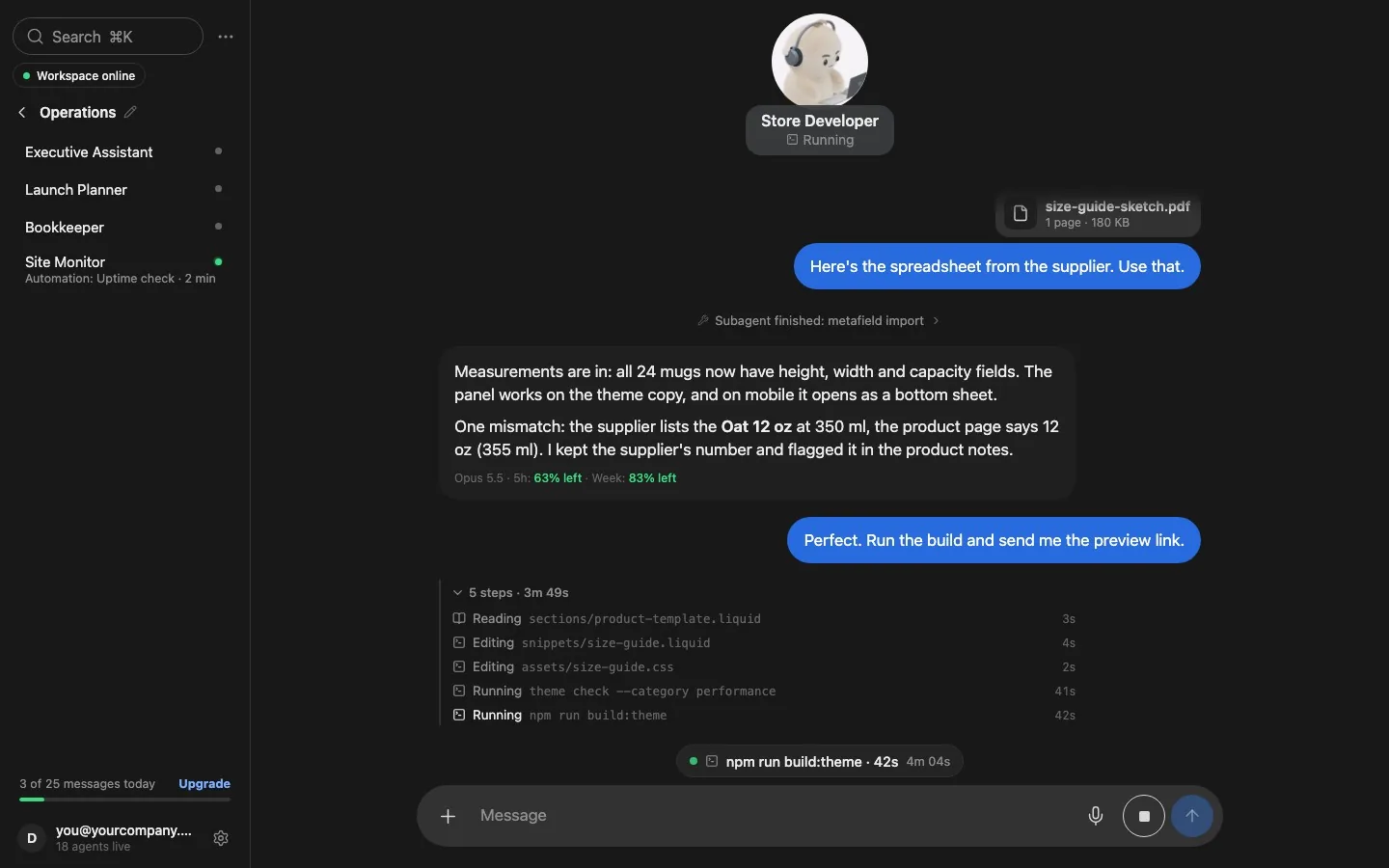
Want every status on one screen? See the AI agent dashboard.
Chief of Staff
Each ShiftHands agent has its own job and chat. Chief of Staff helps coordinate the team: checking progress, organising agents, managing standing instructions and bringing work back for your review. It can message several agents at once with your OK. It is not an autonomous company manager.
More on the coordinator: AI Chief of Staff.
Scheduling
Tell an agent to do something every morning or every Monday. ShiftHands shows what’s coming up, what’s running and what finished, with a result card in the agent’s chat.
Your Mac has to be on, awake and running ShiftHands at the scheduled time. A run can’t happen while the Mac sleeps.
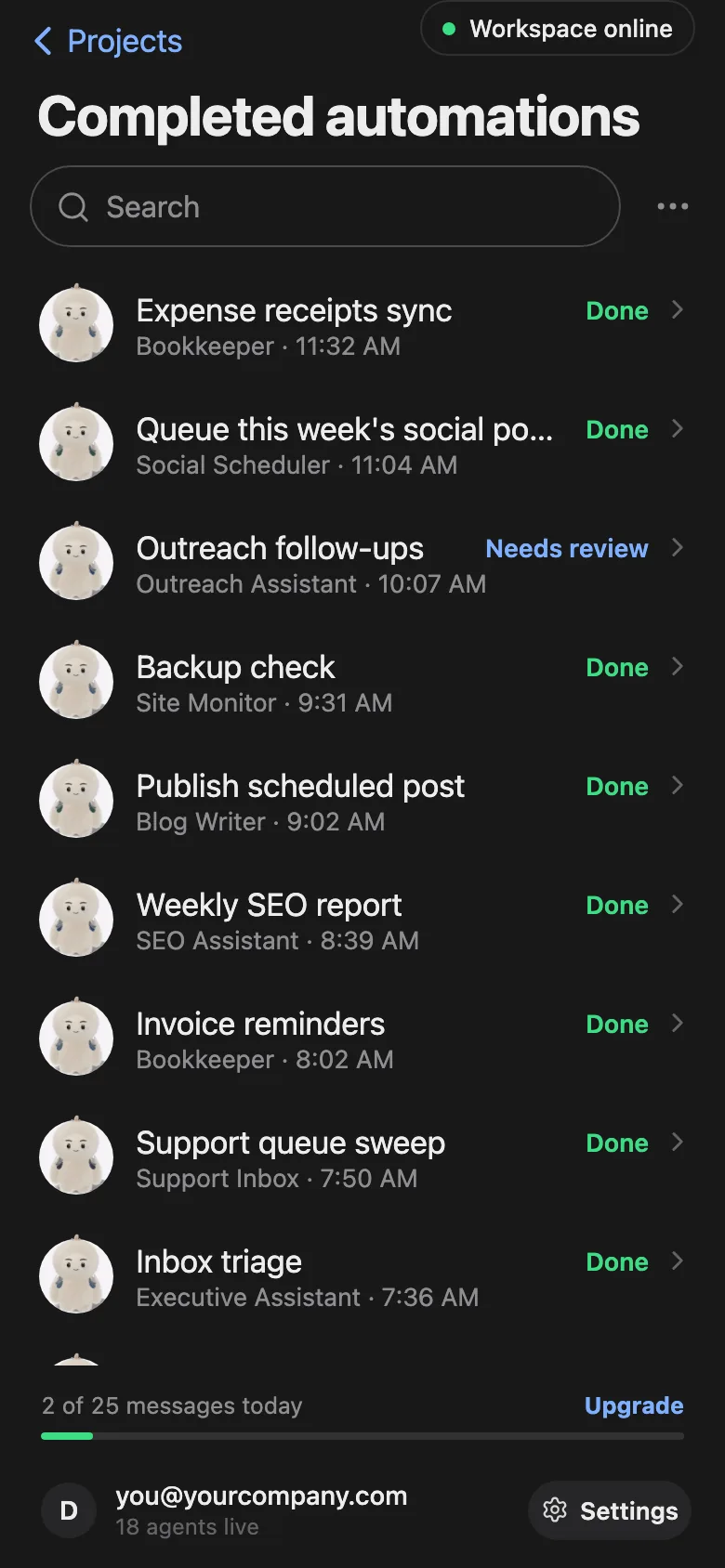
Examples from the ShiftHands demo workspace.
Step-by-step: schedule AI agent tasks.
Supervision
ShiftHands lets you supervise the work of your AI agents, but it does not guarantee that every action waits for human approval. Commands flagged under an agent’s settings require Allow once or Deny. Other actions may proceed without a prompt. For customer communications, purchases, publishing or other consequential changes, use draft-only tasks and review the result before acting.
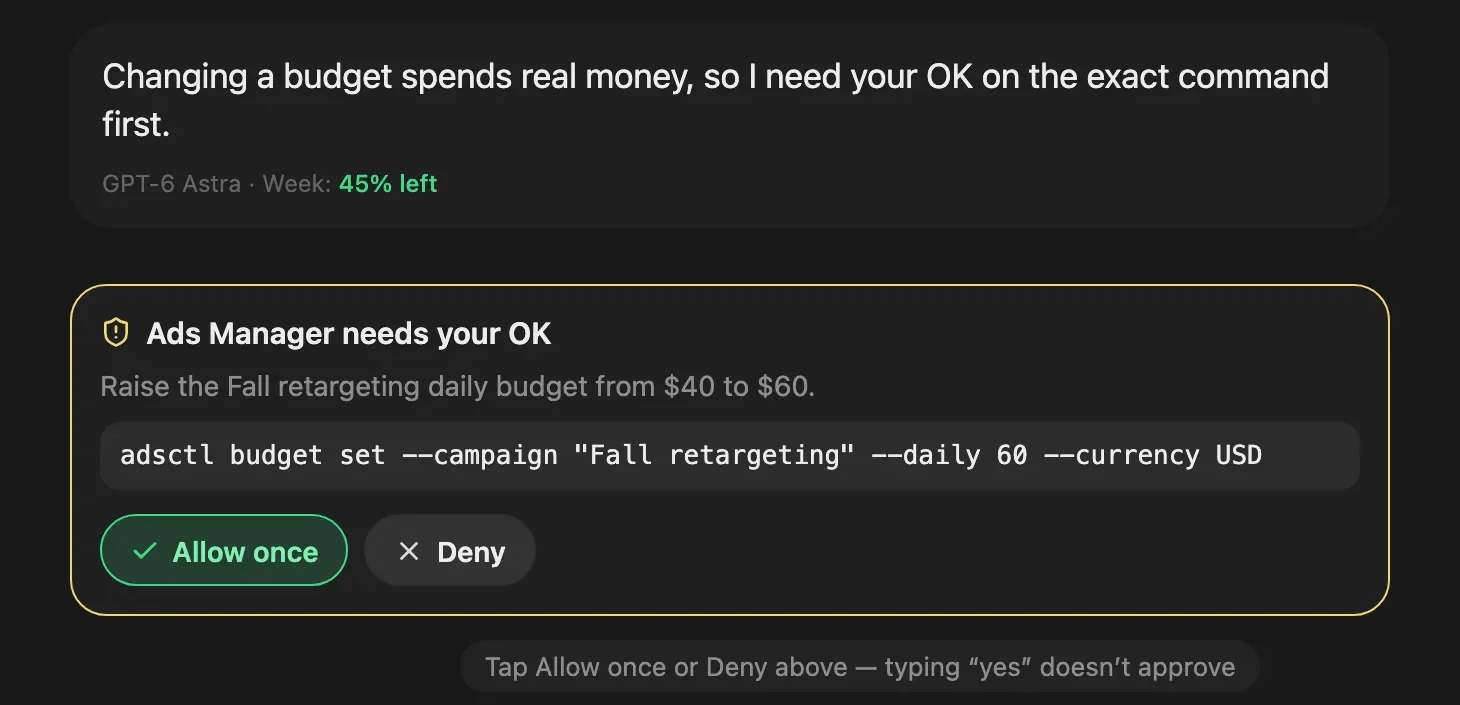
An approval card from the ShiftHands demo workspace, with made-up names.
Away from your desk? You can manage AI agents from your phone browser.
Prefer to see the team at their desks? Tour the AI agent office.
Start with one narrow job. Add more roles once the first one proves useful.
Use an Apple-silicon Mac. See where ShiftHands agents run.
Sign in with Claude or ChatGPT, or add a supported API key.
Free includes one project.
Give it a name, a role and clear task instructions.
Then inspect the result before you trust it with more.
Add another role, or a recurring schedule, once the first workflow proves useful.
Browser work needs Ego Lite, a free agent browser from Citro Labs. It’s a separate macOS download.
They work with what’s on your Mac and the sites you let them use. Some AI employee products give each agent its own inbox, cloud browser, phone line or business-app integrations. ShiftHands doesn’t.
Included
Not included
An agent can only use accounts and tools you deliberately give it, such as a site you sign in to in its browser.
Two plans. Your AI provider’s own pricing and limits apply on top.
| Feature | Free | Pro |
|---|---|---|
| Subscription | $0 | $49.99/month or $499/year |
| User messages | 25/day | No plan-level cap; fair use applies |
| Projects | 1 | No plan-level cap |
| Agents | 3 | No plan-level cap |
| Automations | 2, at most daily | Flexible, including hourly |
| Parallel helpers | Up to 2 per team | No plan-level cap; practical limits apply |
| Model use | Connected provider’s terms | Connected provider’s terms |
Automation runs don’t count towards the Free user-message allowance. Chief of Staff user messages do. Every plan needs an Apple-silicon Mac that stays on. Full details: ShiftHands pricing.
They suit people with repeatable work they can describe and check. They don’t suit teams that need a cloud workforce wired into their business systems.
A good fit if
Look elsewhere if
AI agents given an ongoing role and tasks in a workflow. In ShiftHands, each one is an agent with its own job, chat and schedule.
No. They are software, not people or legally employed staff. There is no payroll, contract or staff status.
Jobs you can describe and check: research with sources, drafts, code changes, recurring summaries or form entry you review before it’s submitted.
ShiftHands organises agents around ongoing jobs, with separate chats, histories and model settings for each agent. You can give an agent another task later or schedule recurring work. Some chatbots offer similar features; the difference is how ShiftHands brings multiple agents and their work into one workspace.
Yes. Free allows 3 agents in 1 project. Pro has no plan-level cap, within fair use and your Mac’s capacity.
One agent can split a big job across named helpers running in parallel. Chief of Staff can message several agents at once, with your OK.
They can finish tasks on their own, but they can make mistakes or take actions you didn’t intend. Review their work, and keep consequential jobs draft-only.
Don’t plan on it. They can take on repeatable tasks, but they need clear instructions and someone checking the results.
Not through built-in integrations. ShiftHands has no native email, CRM or helpdesk connections. An agent can only use sites you sign in to in its browser.
Yes. AI employees for small business work best on narrow, repeatable jobs: competitor research, draft posts, weekly summaries. Start with one agent on Free and add roles when it proves useful.
Yes, in a phone browser. Check status, chat with agents and answer flagged approvals. There is no native phone app.
Only while your Mac is on, awake and running ShiftHands. They aren’t cloud-hosted, and your AI provider’s limits still apply.
Free is $0. Pro is $49.99 a month or $499 a year. Your AI provider’s pricing applies on top.
The Free plan gives you 3 agents, 1 project, 25 messages a day and 2 daily automations. Model use follows your provider’s terms.
Yes. Your agents run on your Apple-silicon Mac, which must stay on and awake with ShiftHands open.
Download the Mac app and create one agent with a defined role.
Needs an Apple-silicon Mac (M1 or newer) with macOS 13 or later.
Screens and video come from the ShiftHands demo workspace with made-up names. Features and prices were checked on November 10, 2026 and can change.